
PasswordFilter – How to Build and Install a Custom PasswordFilter.dll for Active Directory Password Security
In the previous two articles, the reasons for using a Password Filter and how it works in the password change flow of Active Directory were explained. There are, of course, many commercial and open‑source alternatives, such as Microsoft Entra Password Protection or several projects available on GitHub.
With the simple logic described earlier, writing your own Password Filter is completely feasible. The code itself is quite simple and mostly about string handling. The main challenges are performance and making sure you never crash the lsass.exe process. Keep the following points in mind:
-
Handle all exceptions carefully in the code paths you implement. If exceptions are handled well, you almost never have to worry about crashing
lsass.exe. -
Use an in‑memory cache instead of reading files and recompiling patterns on every request. Only reload data when the underlying files change.
-
Make sure your code can safely handle multiple threads reading the same data at the same time.
-
Follow Microsoft MSVC conventions and best practices.
-
Build the DLL for the correct system architecture (x86 or x64).
-
Deploy the DLL correctly to Active Directory and monitor its behavior before putting it into production.
Building PasswordFilter.dll
Helper functions
-
ToLower(): Convert a string to lowercase. -
Utf8ToUtf16(): Convert UTF‑8 strings tostd::wstring. -
TrimWhitespace(): Remove leading and trailing whitespace characters (including\rand\n). -
ReadUtf8Lines(): Read a UTF‑8 file line by line. -
UniStrToWstring(): Convert aUNICODE_STRINGtostd::wstring. -
LoadPatternsIfNeeded(): Readregex.txtif it has changed, recompile the patterns, and store them in the in‑memory cache. -
LoadEnforceIfNeeded(): Read thepasswordfilter.iniconfiguration file if it has changed, extract theenforcevalue, and update the in‑memory cache. -
LoadBlacklistIfNeeded(): Readblacklist.txtif it has changed and store the updated blacklist in the in‑memory cache. -
InitializeChangeNotify(): Default function required bylsass.exe. Called whenPasswordFilter.dllis loaded into the process. -
PasswordFilter(): Default function required bylsass.exe. Called whenever there is a password‑change request and is the main logic of the filter. -
PasswordChangeNotify(): Default function required bylsass.exe. Called after a password has been successfully changed.
Instead of maintaining blacklist entries and patterns in both uppercase and lowercase, normalize everything to one form (for example, lowercase). This way, instead of listing Abc, ABC, ABc, and so on, you only need to store abc.
Utf8ToUtf16() is required because LSASS works with UTF‑16 (wchar_t). Files on disk are typically UTF‑8; to let LSASS process them correctly, they must be converted to UTF‑16 to avoid encoding issues.
Similarly, UniStrToWstring() is needed because PasswordFilter() receives the password parameter as a UNICODE_STRING, not as a std::wstring. Your C++ helper functions such as ToLower, std::wstring::find, or std::regex_search cannot work directly with UNICODE_STRING.
Load***IfNeeded() functions
All three functions—LoadPatternsIfNeeded, LoadEnforceIfNeeded, and LoadBlacklistIfNeeded—share the same idea: they check the last modified time of the underlying file and compare it with the timestamp stored in the cache. If the times differ, the function reloads the file and updates the cache; otherwise, it keeps using the cached data.
static void LoadBlacklistIfNeeded() {
    try {
        std::error_code ec;
        auto ft = std::filesystem::last_write_time(CONFIG_BLACKLIST_PATH, ec);
        if (ec) return;
        {
            std::shared_lock readLock(g_blacklist_lock);
            if (ft == g_blacklist_last_write_time) return;
        }
        std::unique_lock writeLock(g_blacklist_lock);
        if (ft == g_blacklist_last_write_time) return;
        std::vector<std::wstring> lines;
        if (!ReadUtf8Lines(CONFIG_BLACKLIST_PATH, lines)) {
            return;
        }
        for (auto& s : lines) ToLower(s);
        g_blacklist.swap(lines);
        g_blacklist_last_write_time = ft;
    } catch (...) {
    }
}
The example below shows the logic for LoadBlacklistIfNeeded():
-
Wrap the entire function body in a
try/catchblock so that any exception is swallowed and LSASS stays safe. -
Use
std::filesystem::last_write_timeto obtain the file’s last modified time. If an error occurs (for example, file not found), exit the function and keep using the old cache. -
Use
std::shared_lockfor read access so that multiple threads can read the blacklist at the same time. This is useful when LSASS processes many password‑change requests concurrently. -
Use
std::unique_lockfor write access. Only one thread can hold this lock, and while it does, no thread can take the shared lock. This guarantees that only one thread updates the cache whenblacklist.txtchanges, preventing write conflicts or inconsistent data.
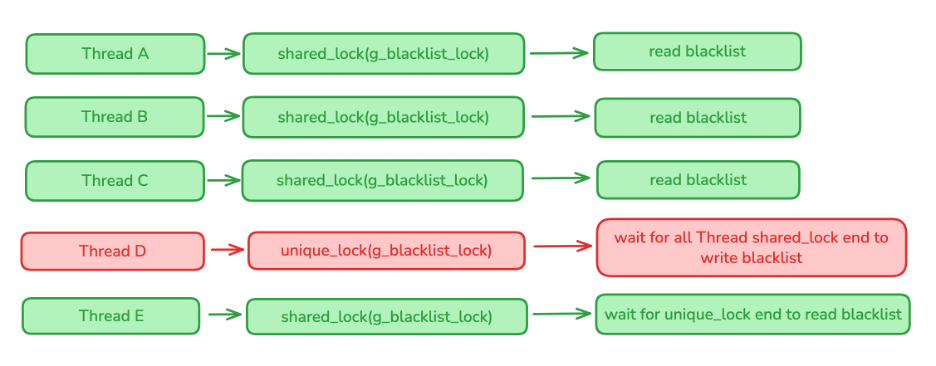
Processing logic for the function:
-
First, acquire a
shared_lockand compareg_blacklist_last_write_timewith the current file modification time. If they are equal, the file has not changed and the function returns immediately. -
If the times differ, acquire a
unique_lock, read the file, convert all lines to lowercase, and then updateg_blacklistandg_blacklist_last_write_timein the cache.
PasswordFilter() function
extern "C" BOOLEAN __stdcall PasswordFilter(
    PUNICODE_STRING AccountName,
    PUNICODE_STRING FullName,
    PUNICODE_STRING Password,
    BOOLEAN SetOperation
) {
    std::wstring pwd;
    try {
        LoadEnforceIfNeeded();
        {
            std::shared_lock enforceLock(g_enforce_lock);
            if (g_enforce == 0) return TRUE;
        }
        if (!UniStrToWstring(Password, pwd)) return TRUE;
        if (pwd.empty()) return TRUE;
        ToLower(pwd);
        LoadBlacklistIfNeeded();
        LoadPatternsIfNeeded();
        {
            std::shared_lock readLock(g_blacklist_lock);
            for (const auto& bl : g_blacklist) {
                if (bl.empty()) continue;
                if (pwd.find(bl) != std::wstring::npos) {
                    SecureZeroMemory(pwd.data(), pwd.size() * sizeof(wchar_t));
                    return FALSE;
                }
            }
        }
        {
            std::shared_lock readLock(g_patterns_lock);
            for (const auto& pattern : g_patterns) {
                if (std::regex_search(pwd, pattern)) {
                    SecureZeroMemory(pwd.data(), pwd.size() * sizeof(wchar_t));
                    return FALSE;
                }
            }
        }
        SecureZeroMemory(pwd.data(), pwd.size() * sizeof(wchar_t));
        return TRUE;
    } catch (...) {
        SecureZeroMemory(pwd.data(), pwd.size() * sizeof(wchar_t));
        return TRUE;
    }
}
The main PasswordFilter() function can be summarized as:
-
Update the
enforcevalue if the configuration file has changed. -
Check whether
enforce == 0. This flag works like an on/off switch:0means PasswordFilter checks are disabled,1means they are enabled. Ifenforceis0, returnTRUE. -
Convert the new password from
UNICODE_STRINGtostd::wstringand normalize it to lowercase. -
Reload the blacklist and regex patterns if their files have changed.
-
Check whether the password contains any substring from the blacklist.
-
Check whether the password matches any of the compiled regex patterns.
Important points:
-
The entire body of the function is inside a
try/catchblock to ensure all exceptions are handled, even if the called helper functions already catch their own exceptions. -
Before every return, always clear the plaintext password from memory by calling
SecureZeroMemory(), following Microsoft’s recommendation. -
If any exception occurs, the function returns
TRUE. This ensures that LSASS continues running smoothly and the filter never breaks the overall password‑change process.
You can place the full implementation of these helper functions and the filter logic in a separate “PasswordFilter Code” file for reuse and maintenance.
Building PasswordFilter.dll (Visual Studio)
This section describes how to build PasswordFilter.dll for an x64 Active Directory server using Visual Studio.
Step 1: Create the project
-
File → New → Project/Solution → “Dynamic‑Link Library with exports (DLL)” → fill in project information.
Step 2: Add the C++ source file
-
Create a C++ file (for example,
PasswordFilter.cpp) and paste in all code from your PasswordFilter implementation. -
You can customize the logic inside
PasswordFilter()and helper functions as you like, but the three functionsInitializeChangeNotify,PasswordFilter, andPasswordChangeNotifyare mandatory.
Step 3: Configure the build
-
Right‑click the project → Properties.
-
Configuration:
Release. -
Platform:
x64. -
Configuration Properties → General → C++ Language Standard →
ISO C++ 17 Standard (/std:c++17). -
Configuration Properties → General → C Language Standard →
Default (Legacy MSVC).
LSASS calls exactly three functions by their exported names. To keep those names intact in the DLL, you have two options:
-
Use
extern "C"with__declspec(dllexport), or -
Use a
.def(module definition) file.
If you do not use one of these methods, the compiler will mangle the names (for example, ?PasswordFilter@@YAHPAU_UNICODE_STRING@@0N@Z), and LSA will not be able to find the correct export names.
Module definition file
-
Create a
PasswordFilter.deffile in the same folder asPasswordFilter.cpp. - Add the following content:
LIBRARY PasswordFilter
EXPORTS
InitializeChangeNotify
PasswordFilter
PasswordChangeNotify
-
If the
.deffile is not picked up automatically, configure it explicitly: -
Right‑click project → Properties → Linker → Input →
Module Definition File→ enterPasswordFilter.def.
Build the project
-
Build → Build Solution (Ctrl + Shift + B).
-
The DLL will be generated at:
[Project Folder]\x64\Release\PasswordFilter.dll
Verify exports
-
Open “Developer Command Prompt for VS”.
-
Run:
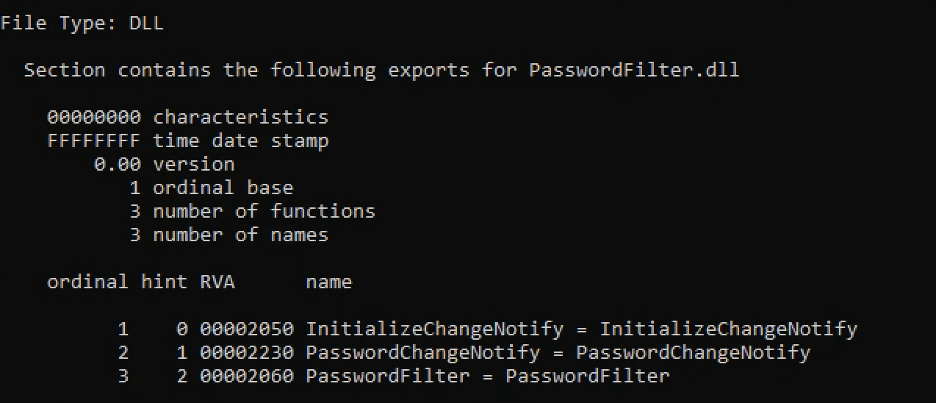
dumpbin /exports [Project Folder]\x64\Release\PasswordFilter.dll. -
Make sure the three functions
InitializeChangeNotify,PasswordChangeNotify, andPasswordFilterare present in the exports list.
Installing PasswordFilter.dll on Active Directory
-
Copy
PasswordFilter.dlltoC:\Windows\System32on the Active Directory server. -
Register the DLL as an LSA extension in the registry:
-
Go to
HKLM\SYSTEM\CurrentControlSet\Control\LSA. -
Edit the
Notification Packagesvalue. -
Add
PasswordFilter(without the.dllextension) on a new line.
-
Example before:
scecli
pwdmig
After adding:
scecli
pwdmig
PasswordFilter
-
Create the files
blacklist.txt,regex.txt, andpasswordfilter.iniunderC:\ProgramData(or another directory, matching the paths in your code). -
In
passwordfilter.ini, configure:-
enforce=1→ enable blacklist and regex checks. -
enforce=0→ skip all PasswordFilter checks.
-
-
Because LSA runs under the SYSTEM account, make sure the files in
C:\ProgramDataare readable by SYSTEM. -
Reboot the server so that LSA can load the new PasswordFilter DLL.
-
To verify that the DLL has been loaded, run:
-
tasklist /m PasswordFilter.dll
-

If the DLL appears in the module list for lsass.exe, your custom PasswordFilter has been successfully installed and is ready to enforce your password rules.
Rollback in Case of Errors
If the password‑change flow fails and you determine that the root cause is an error in the PasswordFilter logic (the error can usually be found in the Security log in Event Viewer), you can apply one of the following rollback options:
-
Clear the contents of the two files
C:\ProgramData\regex.txtandC:\ProgramData\blacklist.txt. When these files change, the next time a password change request is received, the PasswordFilter will reload them and refresh the pattern and blacklist data. -
Edit the
enforcevalue inC:\ProgramData\passwordfilter.ini(1= Enable,0= Disable). -
Remove the PasswordFilter entry from the registry at
HKLM\SYSTEM\CurrentControlSet\Control\Lsa\Notification Packagesand reboot the server.
When the Server Cannot Reboot Because of PasswordFilter
-
Boot the server into Directory Services Restore Mode (DSRM) or Safe Mode, then remove the PasswordFilter entry from the registry.
-
From WinRE, rename
C:\Windows\System32\PasswordFilter.dllto any other name that does not match the value configured in the registry. On the next boot, LSASS will no longer load that PasswordFilter DLL.