
PasswordFilter - LSA Password Change Workflow and Custom PasswordFilter Processing Logic
PasswordFilter workflow
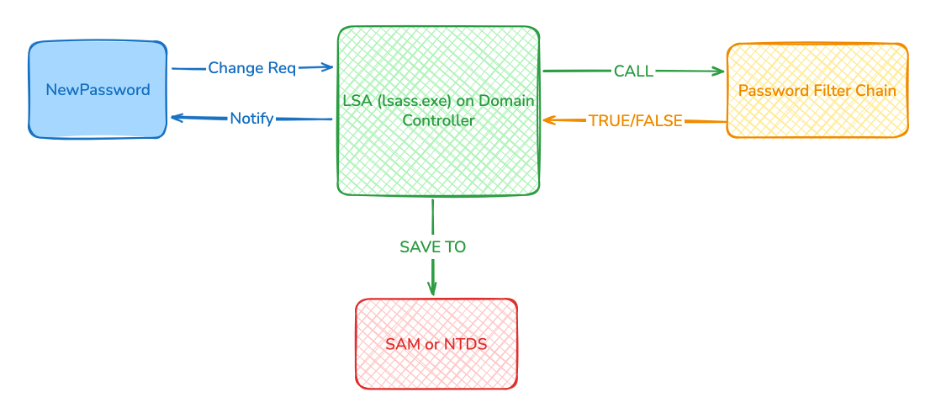
What happens when a Domain Controller receives a password change/reset request for any account? The workflow is as follows:
-
The user sends a change/reset request with a new password to the Domain Controller, via GUI tools,
net user,Set-ADAccountPassword, an API call, and so on. -
The Domain Controller receives the request and forwards it to the password‑change process inside LSA (
lsass.exe). -
lsass.execalls the PasswordFilter chain to verify whether the new password complies with the configured password policies. The PasswordFilter chain can include:-
Custom PasswordFilter.DLL
-
Passfilt.dll -
Password Policy configured in Group Policy
-
-
If the new password satisfies the policy, it is stored in SAM or NTDS and the user is notified of success. Otherwise, the user is notified that the password does not comply with the password policy.
Custom PasswordFilter.DLL processing logic
A custom PasswordFilter must implement the three default functions defined by Microsoft:
-
InitializeChangeNotify(): Initializes the filter and loads configuration. This function is called whenlsass.exeloadsPasswordFilter.dllduring startup. -
PasswordFilter(): Validates the password and returns the result tolsass.exe. -
PasswordChangeNotify(): Usually returnsSTATUS_SUCCESS. This function does not affect the password change itself; it is called only after the password has been changed successfully.
When you register a PasswordFilter.DLL, it is loaded into the lsass.exe process when lsass.exe or the whole system starts. Whenever the system receives a password change/reset request by any method, lsass first calls the PasswordFilter() function of this DLL. This function runs whatever validation logic you define and returns the result to lsass.
-
If it returns
TRUE, other components in the PasswordFilter chain continue processing and perform additional checks before the password is finally stored. -
If it returns
FALSE, the password is rejected immediately and the user is informed.
Detailed PasswordFilter() workflow
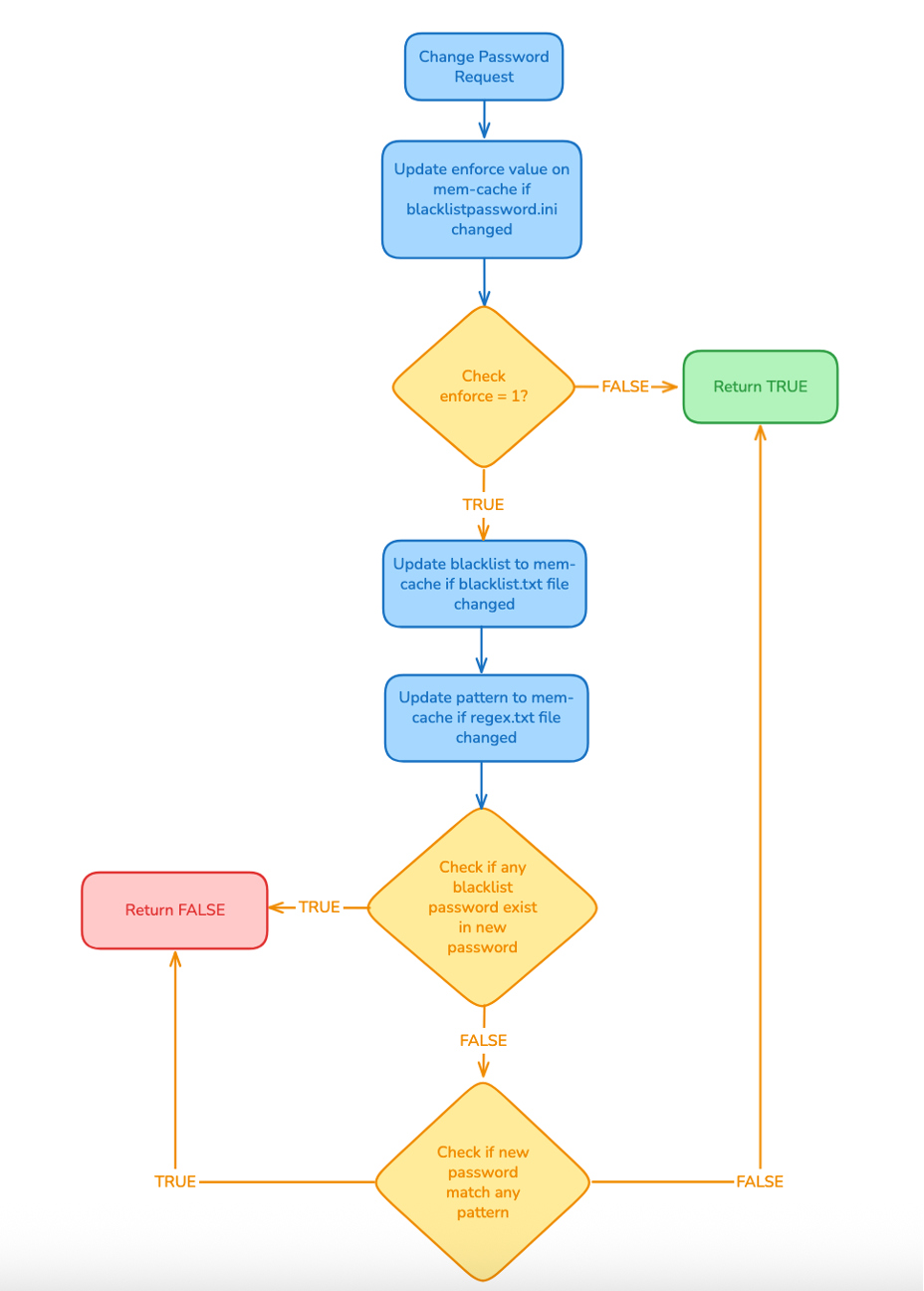
Based on the diagram, the PasswordFilter() function in this example works as follows:
-
The system receives a password change/reset request and calls
PasswordFilter(). -
The function checks whether the
passwordfilter.inifile has changed. If it has, theenforcevalue in the in‑memory cache is updated. -
The function reads the
enforcevalue from the in‑memory cache:-
If the value is
0(meaningenforce = false), the function skips all further checks and returnsTRUE. -
Otherwise, it continues with the next validation steps.
-
-
The function checks whether
blacklist.txthas changed. If it has, it reloads the blacklist into the in‑memory cache. Theblacklist.txtfile can contain entries such asadmin,root,password, and so on, with one string per line, case‑insensitive. -
The function checks whether
regex.txthas changed. If it has, it reads the file and compiles all patterns into the in‑memory cache. For example,20[0-9]{2}can be used to match any year from 2000 to 2099. Each pattern is listed on a separate line and is treated as case‑insensitive. -
The function scans all entries in the blacklist. If the new password contains any of these substrings, it returns
FALSE. If not, it moves on to the next step. -
The function evaluates all compiled regex patterns stored in the in‑memory cache. If the new password matches any pattern, it returns
FALSE. If the password does not match any pattern, it returnsTRUE, allowinglsassto continue with the remaining checks and then complete the password change for the user.
Conclusion
These are the processing steps inside the PasswordFilter() function whenever a password change or reset request is received. The function returns TRUE or FALSE, telling lsass.exe whether it should continue with the rest of the password‑change workflow.
In the next article, you will walk through the actual code, explain how it works, and show how to build and deploy the PasswordFilter on a Domain Controller server.