
[Codevel Project] – Authentication & Authorization Explained
Before we dive into Codevel’s implementation, let’s quickly recap two key concepts.
I. Authentication vs Authorization
1. Authentication
Verifies whether a user (identified or anonymous) is who they claim to be, granting access to certain features or additional personalized data.
2. Authorization
Determines what actions an authenticated user can perform.
Just because someone logs in doesn’t mean they can do everything!
For example, only admin users should be able to manage other users or delete posts — if a regular user (user_a) can do that, it’s a serious bug 😅 (and should return 403 Forbidden).
II. Role-Based Access Control (RBAC)
The simplest way to manage permissions is Role-Based Access Control (RBAC).
Each user account belongs to a role group, which defines what features they can access:
-
Administrators
-
Can create, edit, and delete posts.
-
Can manage other users.
-
-
Users
-
Can change their password.
-
Can edit profile information.
-
Can like posts.
-
If a normal user can access the admin page or delete a post — it’s time to check your code. 😉
III. Codevel.io Authentication Flow
Codevel.io uses both authentication and authorization.
At the time of writing, most authenticated operations are admin-related, but the same principles apply for all users.
There are three types of pages on Codevel.io:
1. Public Pages
Anyone can access these pages. Logged-in or not, the data is identical.
Examples:
/about-us, /contact-us, /terms-of-service, /posts, /hashtag
2. Hybrid Pages (Public with login check)
These pages behave differently depending on login status.
-
If you’re not logged in, some actions (like the “Like” button) are disabled or redirect to
/login. -
If you’re logged in, you can interact — e.g., like posts, view personalized headers, etc.
Example: /posts/[slug]
3. Authenticated Pages (Login required)
You must log in to access these pages.
If the request doesn’t include a valid Authorization header (JWT token), it either returns no data or redirects to /login.
IV. Example: Handling Hybrid Page Requests
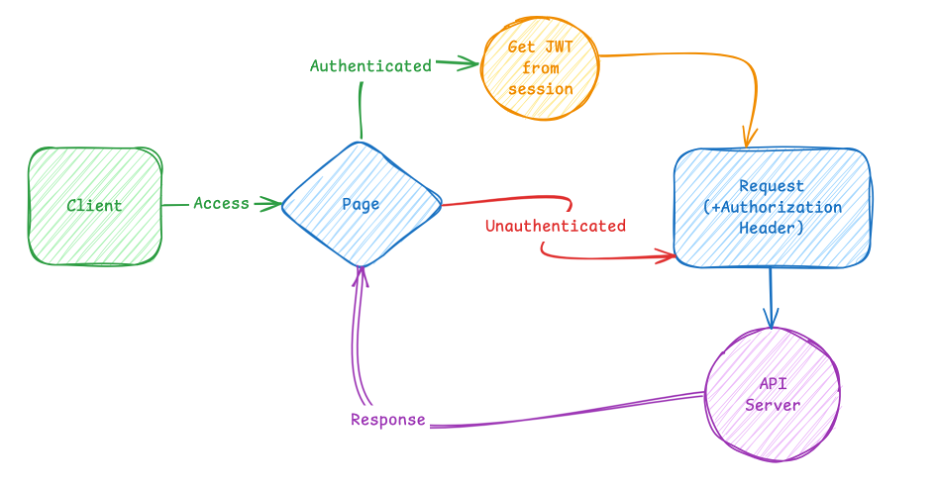
If you look closely, there’s actually no access blocking in these pages —
the only check performed is whether the user is logged in or not, so that the request can be sent with the correct headers.
Here’s how it works:
-
I use the
cookies()function from thenext/headerslibrary to retrieve the stored cookie value. -
To keep cookies secure, I don’t store them on the client side — they live on the server side only.
This helps ensure that sensitive session data (like JWT tokens) never gets exposed in the browser.
When a user opens /posts/[slug], the page calls a function:
export const getPostContent = cache(async (slug: string) => {
  const headers = await getHeaders(false);
  const res = await fetch(`${process.env.NEXT_PUBLIC_POST_API_URL}/content/${slug}`, {
    headers: headers,
    next: { revalidate: 60 }
  });
  return await res.json() as PostContentResponse;
});
Before sending the request, it calls getHeaders() to build request headers:
export async function getHeaders(required: boolean = true, pathname: string = "") {
  const cookieStore = await cookies();
  const token = cookieStore.get("session")?.value || "{}";
  const expires = JSON.parse(token).expires;

  if (required) {
    if (token == "{}" || expires < Date.now()) {
      redirect("/login?next=" + pathname);
    }
  }

  if (token == "{}") {
    return {
      'Content-Type': 'application/json',
      Authorization: ''
    };
  } else {
    return {
      Authorization: `Bearer ${JSON.parse(token).token}`,
      'Content-Type': 'application/json',
    };
  }
}

The generated header is then sent to the backend.
Backend API Example (Spring Boot)
@GetMapping("/content/{slug}")

public PostContentResponse getPostContent(@PathVariable String slug, @RequestHeader HttpHeaders headers) {

    String username = jwtUtil.getUsername(jwtUtil.getTokenFromHeader(headers));

    return postService.getPostContent(slug, username);

}
The server extracts the JWT token from headers, validates it, and returns content accordingly.
V. Pages that Require Authentication
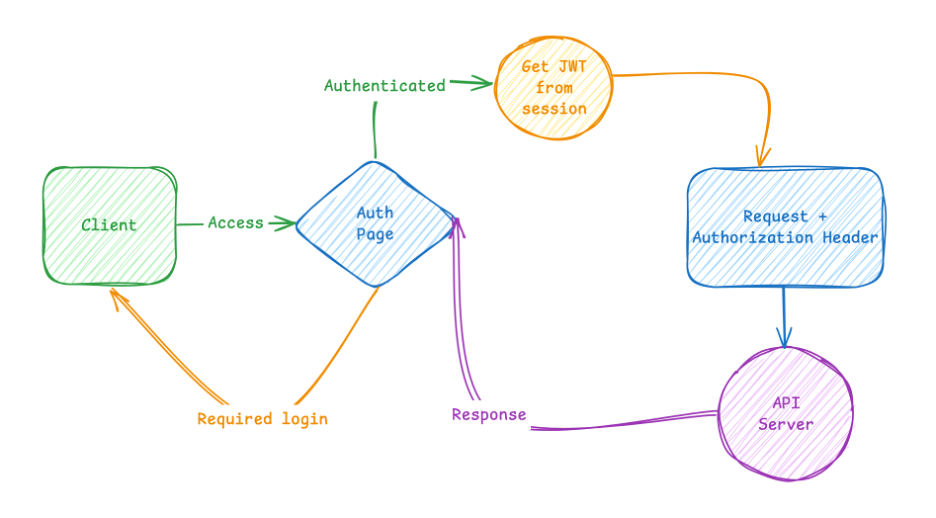
For example, /account uses the same logic but passes required = true to getHeaders().
If no session or token is expired, it immediately redirects to /login before making the API call.
Even if someone tries to modify this behavior on the client — don’t worry.
I validate everything again on the server side 😎.
API Endpoint Structure
To separate permission scopes, I use endpoint prefixes:
-
/admin— Admin-only operations (requires role check + token validation) -
/auth— Requires authentication (token validation only) -
No prefix— Public APIs accessible without login
VI. Summary
-
Codevel.io pages are grouped into three types:
-
Public Pages
-
Hybrid Pages
-
Authenticated Pages
-
-
JWT tokens are stored securely via server-side cookies.
-
Role-Based Access Control ensures proper authorization.
-
All protected APIs validate tokens on both client and server.