
[Codevel Project] – Continue with Authorization
I. Introduce
In the previous article, I discussed Authentication. Now, let’s move on to Authorization.
Authorization defines which features and actions an authenticated account can perform.
Of course, even unauthenticated (anonymous) users have some “rights,” but they’re very limited 😄.
II. User Roles in the System
The basic roles in Codevel.io include:
-
Admin: Has full system access — add, edit, delete posts, manage users, and more 😆
-
Normal User: Can favorite posts, update profile info, change password, or comment (in future)
-
Anonymous: Can only read posts, view pages, and search content
III. Role Model Design
Typically, a role-based system has three tables:
-
roles
-
users
-
user_roles (a mapping table linking users and roles)
However, in Codevel.io, there are only two main roles:
-
ROLE_ADMIN -
ROLE_USER
So I simplified it by using just one role column in the users table.
IV. Communication between Backend and Frontend
The Backend and Frontend communicate via HTTP request/response.
Each request includes an Authorization Header:
Authorization: Bearer <JWT_TOKEN>
Process:
-
When a user logs in successfully, the server returns a JWT token.
-
The token is stored in a server-side cookie for better security.
-
Every subsequent request includes the
Authorizationheader. -
The server verifies:
-
Whether the token exists.
-
Whether it has expired.
-
If valid → extract the username → execute logic under that user’s context.
-
(I’ll write a separate article about JWT on both backend and frontend later.)
V. Differentiating Access Control on the Server
How does the server know which endpoints require:
-
Admin privileges,
-
Authenticated users,
-
Or are publicly accessible?
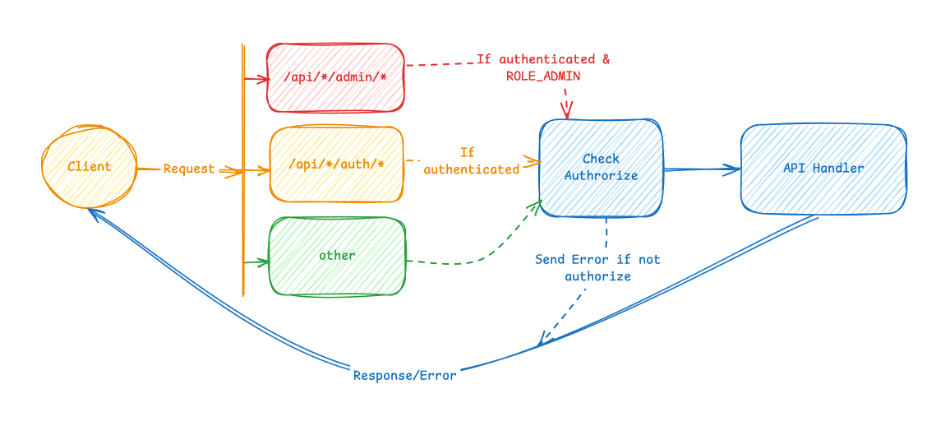
Every request passes through a SecurityFilterChain in Spring Security (as shown below).
@Bean
public SecurityFilterChain filterChain(HttpSecurity http) throws Exception {
    http
        .cors(cors -> cors.configurationSource(corsConfigurationSource()))
        .exceptionHandling(ex -> ex.authenticationEntryPoint(authEntryPointJwt))
        .sessionManagement(sm -> sm.sessionCreationPolicy(SessionCreationPolicy.STATELESS))
        .authorizeHttpRequests(auth -> auth
            .requestMatchers("/api/*/admin/*").hasAnyAuthority("ROLE_ADMIN")
            .requestMatchers("/api/*/auth/*").authenticated()
            .anyRequest().permitAll()
        )
        .csrf(AbstractHttpConfigurer::disable);

    http.addFilterBefore(authTokenFilter(), UsernamePasswordAuthenticationFilter.class);

    return http.build();

}
For API access check it is described as follows
VI. Handling Access Control per API Group
1. /admin/** requests
-
Check if Authorization Header exists.
-
If present → extract JWT → verify that the user has
ROLE_ADMIN.
@PostMapping("/admin/add-post")
public boolean addPost(@RequestBody AdminAddPostRequest request) throws ExceptionResponse {
    return postService.addPost(request);
}
2. /auth/** requests
-
Validate Authorization Header.
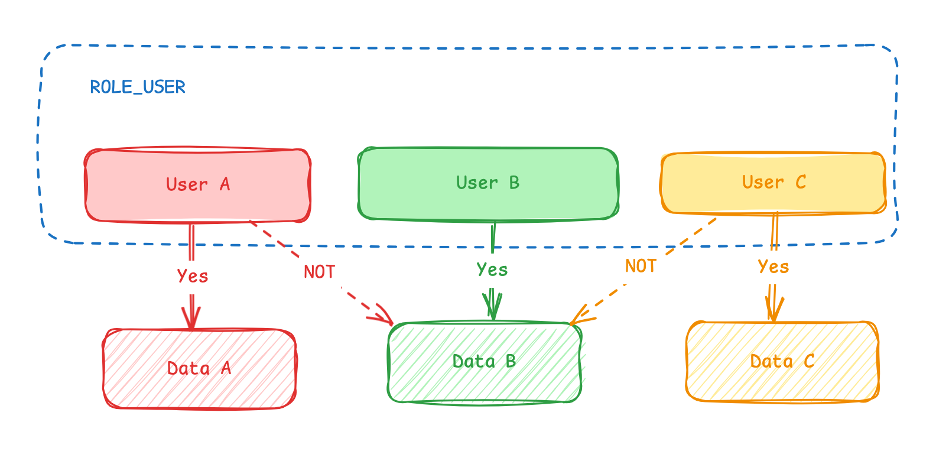
-
If valid → only allow actions on that user’s own data, not on another user’s, even if they share the same role.
@PostMapping("/auth/like-post/{id}")
public boolean likePost(@PathVariable Long id, @RequestHeader HttpHeaders headers) throws ExceptionResponse {
    String username = jwtUtil.getUsername(jwtUtil.getTokenFromHeader(headers));
    return postService.likePost(username, id);
}
3. Public requests
-
No token check required.
@GetMapping("/search")
public ListPostResponse getPosts(@RequestParam int page, @RequestParam(defaultValue = "") String search, @RequestParam String sort){
    return postService.getPosts(page, search, sort);
}
VII. Vertical vs. Horizontal Role-Based Access
There are two common types of RBAC (Role-Based Access Control):
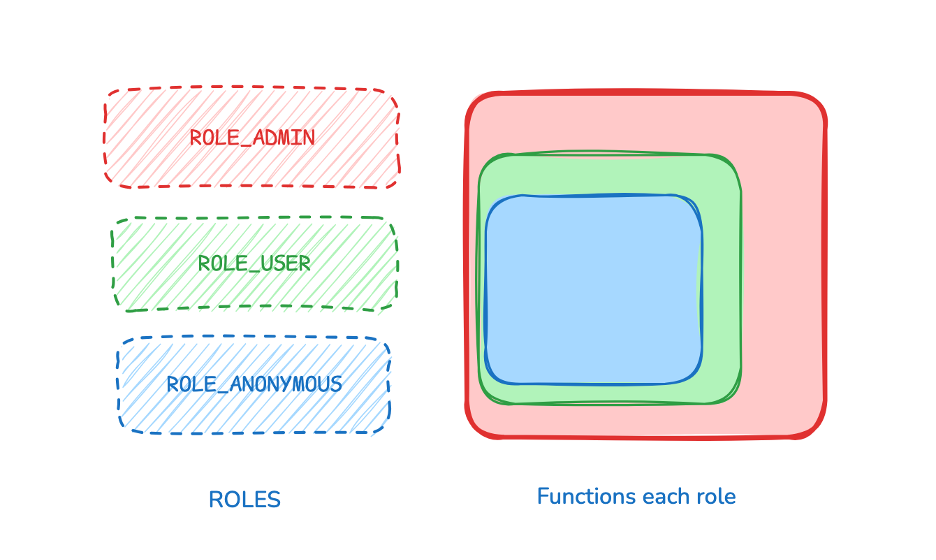
1. Vertical RBAC
-
Roles such as
ROLE_ADMIN,ROLE_USER,ROLE_ANONYMOUS. -
Each role has different permissions.
-
Higher roles can inherit or isolate lower-level privileges.
2. Horizontal RBAC
-
Users within the same role can access only their own data.
-
For example: UserA shouldn’t view or modify UserB’s data,
even if both areROLE_USER. -
Avoid passing user IDs directly in requests — rely on JWT claims for user identity.
VIII. Summary
- Authorization clearly defines who can do what within the system.
- With Spring Security + JWT, Codevel.io achieves a balance between security, scalability, and implementation simplicity.